
Requirements: OS 2.1 +
Overview: What is WhatsApp+? Basically it is a customizable WhatsApp where you can change lots of colours, sizes, and many other visual MODs In addition you can increase upload media limit (stock limit is 16Mb) to send large music files or videos.
You can increase quality of pictures sent (by default resolution is decreased quite a lot) You can share music just with one click You can add contact profile pictures to their chats You can hide contact profile pictures and show phonebook pictures (in chat screen) Built-in theme viewer and downloader. Check WhatsApp+ users themes online and apply theme if you like And more to come Remember to previously uninstall whatsapp if you come from the official version (if not you will get the “not installed” error)
Version 5.60D
Changelog:
*Base updated to last play store version: 2.11.238
*add option to group mute dialog to show/hide notifications
*add option to delete media files when deleting media messages
*add unread count badges for Samsung devices (recreate your homescreen icon if it is not working)
*fixes to allow more audio attachments
*add Slovenian and Azerbaijani translations
*Enabled quick access icon for camera in Chat screen (in base 2.11.238 is disabled)
*Other improvements and bux fixes
Instructions To INSTALL (UNROOT):
1) First backup your conversations by pressing OPTION button
Go to Settings>Chat settings>Backup Conversations
2) Then Uninstall OLDER WHATSAPP & Install ONLY WA+ apk …
3) Click AGREE & CONTINUE
4) If you have BACKED UP your CHATS then there should be Restore BUTTON , PRESS IT
(If you Dont get restore button then install original whatsapp from play store , do verification process and then chat with 1-2 person again backup and then uninstall it again install apk that i given to you there will definitely get RESTORE button)
5) Wait it might take some long
6) Press Continue and then
7) Press MENU button And You can see HIDE ONLINE STATUS button press it and BOOM …(If you cant see that menu then goto PLUS=> 2. Main/chats screen =>Untick 2.3 HIDE STATUS MOD MENU)
8) Enjoy Whatsapp+ with hiding last seen feature enabled
Instructions To INSTALL (ROOT):
* FIRST YOU NEED TO INSTALL ORIGINAL WHATSAPP WITH A REGISTRED PHONE NUMBER.
PROBLEM DOWNLOADING FILES? CLICK ME FOR GUIDE HOW TO DOWNLOAD FROM FILE HOSTS SUCH AS TUSFILES, LOUDUPLOAD, ETC..
DOWNLOAD FILE(S) BELOW:
APK:
LOUDUPLOAD:
THEMEDIASTORAGE:
TUSFILES:
TURBOBIT:
IF YOU ENJOY THE GAME/APP PLEASE PURCHASE IT ON GOOGLE PLAYSTORE TO SUPPORT THE DEVELOPER, CLICK THE LOGO BELOW:

The program is designed specially for playing audio books.
Assumed that you have audiobooks and already copied them to your phone.
Features:
+ Playback speed control.
+ Classification of books (new, started, finished).
+ Download cover from the Internet.
+ List of characters. You can manually create a list of characters to easier follow the story.
+ Automatic pause in case you fall asleep. To continue playback just shake your phone.
+ Playback history.
+ Application Widget. Allows you to control the player from the home screen.
+ By specifying a root folder containing all your audiobook, you can exclude your folders which contains music and other audio files.
+ You don’t have to finish one book to start another. The progress is saved independently for all books.
+ NO ADS!
What’s New
+ Redraw buttons for Full HD phones (like Galaxy S4, S5, HTC One, etc).
+ Added SD2 button in Root folder selection window to select folder on SD card.
Requires Android 4.4.
+ Added Lock animation (lock button is placed in top-right corner of player window).
+ Fixed cover art downloading, bookmarks, character list issue on Android 4.4 if books are hold on SD card. Now all data in this case are stored in “Smart AudioBook Player Backup” folder in the phone internal memory.
PROBLEM DOWNLOADING FILES? CLICK ME FOR GUIDE HOW TO DOWNLOAD FROM FILE HOSTS SUCH AS TUSFILES, LOUDUPLOAD, ETC..
DOWNLOAD FILE(S) BELOW:
APK:
LOUDUPLOAD:
THEMEDIASTORAGE:
TUSFILES:
TURBOBIT:
IF YOU ENJOY THE GAME/APP PLEASE PURCHASE IT ON GOOGLE PLAYSTORE TO SUPPORT THE DEVELOPER, CLICK THE LOGO BELOW:

With SideControl you get full control over your phone! From everywhere, at any time!
Gestures | Sidebars | Multitasking – all in one!
Lock your phone, kill all running apps, switch to recent app or open latest notification with a swipe.
Easily launch apps or even shortcuts to contacts, tasker profiles, bookmarks or similar.
Create different SideBars with categories like apps, games, tools and launch them with a dedicated gesture!
It’s all your choice. Customize and speed up your phone handling.
Easy multitasking! Simple, fast and efficient!
NEW: Use all 45+ SideControl actions in other apps! Start actions directly from your homescreen launcher!
Just add a new shortcut and select a SideControl action.
FEATURES:
• Compatible with homescreen launchers (Nova, Go, ADW,..)
• Icon pack support (Nova, Go, ADW,..)
• xHalo mode support (floating window, Xposed)
• xMultiwindow mode support (Xposed)
• Xposed advaced features (root required)
• Low battery consumption
• Up to 3 Touch Areas to start Gestures (Custom size, style and position)
• Up to 8 predefined Gestures per Touch Area
• Up to 4x Favorites Lists to Categorize your Apps
• SideBar / GridView with Apps and Shortcuts
• Full Shortcut support (Tasker, System settings, Direct Calls, Messages,…)
• Fast and fluid handling
• Easy configuration
• Backup & Restore settings
ACTIONS:
• Open Application/Shortcut (Direct Calls, System Settings, Tasker Profiles,…)
• Open last notification (4.3+)
• SideBar Recent Apps
• SideBar Notifications (4.3+)
• SideBar Favorite Apps #1-4
• GridView Recent Apps
• GridView Notifications (4.3+)
• GridView Favorite Apps #1-4
• Toggle 2 last Apps
• Last Apps (Cycle)
• Next Apps (Cycle)
• Show Settings Bar
• Show Notification Bar
• Go to Homescreen
• Open Taskmanager
• Flash/Torch (1 min. Timer)
• New Calendar Event
• New Message
• Toggle Auto Brightness
• Toggle WiFi
• Toggle Sound
• Music Pause,Play
• Music Next
• Music Previous
• Kill all running (Xposed)
• Kill foreground app (Xposed)
• Power menu (Xposed)
• Take screenshot (Xposed)
• Screen off (Xposed)
• Back key (Xposed)
• Menu key (Xposed)
• Search key (Xposed)
• Media Pause/Play (Xposed)
• Media Next (Xposed)
• Media Prev (Xposed)
• Kill foreground app & screen off (Xposed)
• Back key & screen off (Xposed)
• Cancel all notifications
• more to come…
To use Xposed features your phone needs to be rooted!
SIDEBARS:
• Multiple SideBars / GridViews
• Recent apps, notifications, favorite apps and shortcuts
• Create different sidebars with categories like apps, games, tools …
• Custom actions on Double tap, Long press, Push out
• Custom actions: Open in xHalo / xMultiwindow, Show app info, Kill app…
• Running apps indicator
• Auto hide (6sec)
• Fully customizable style (Size, color, label, opacity, backgrounds, rotation…)
LANGUAGES:
• English
• German
• Spanish
• French
• Italian
• Turkish
• Polish
• Chinese
• Persian
• Russian
What’s New
3.00
- NEW: Icon pack
(Nova, ADW..)
- NEW: On notification:
- Override Gestures
- Swipe to open/notif.
- NEW: xMultiwindow support!
- NEW: Organize Favorites screen
- Slide left-right to remove
- Drag to reorder
- NEW: Favorite / Recent apps
custom actions:
- Long press
- Push out
- Double tap
- NEW: Custom actions:
- Open in xHalo mode
- Open in xMultiwindow
- Show app info
- Open in PlayStore
- Kill app
- NEW: Super smooth list
scrolling!
- & much more
PROBLEM DOWNLOADING FILES? CLICK ME FOR GUIDE HOW TO DOWNLOAD FROM FILE HOSTS SUCH AS TUSFILES, LOUDUPLOAD, ETC..
DOWNLOAD FILE(S) BELOW:
APK:
LOUDUPLOAD:
THEMEDIASTORAGE:
TUSFILES:
TURBOBIT:
IF YOU ENJOY THE GAME/APP PLEASE PURCHASE IT ON GOOGLE PLAYSTORE TO SUPPORT THE DEVELOPER, CLICK THE LOGO BELOW:

A camera to give you back the pleasure of shooting beautiful photos.
With a simple yet stylishly powerful interface, this photographic camera app includes a large variety of live photo filters in lightning-fast real-time, such as several Lomo and Lo-Fi effects, artistic painting, cartoon and paper styles, vintage, retro, analog, several deformations types, including even fish-eye, wide angle camera filters, and many more… in total over 125 camera photo effects, and 30 Borders/Frames.
Lomography, Analogic and Hipster photography lovers will be pleased with the emulated effects of some classic cameras such as Holga, Zenit, Lomo LC-A, and even an awesome Super-8 style.
Record easily GIF animations with all the available effects..You can also change the GIF recording speed to produce funny GIF animations.
With the unique Cameringo viewfinder, now you can keep shooting while in photo review mode, allowing comparison of the last photo taken against the live image. Plus, the horizon level indicator gives you now better control over the angle of the photo.
Get now mad-face shots with the unique Virtual Flash for Front-Facing Cameras. The idea is very simple, in complete darkness the screen will light up enough to give you the chance to snap your grin. Not all effects are suitable for this, so try it first with “original”.
Other included features are a clever image stabilizer, silent camera mode, histogram, Geo Tagging (GPS Location), guidelines, tap to shoot, macro-focus, and even the option to shoot perfectly squared photos making it easier to upload into Instagram.
A new effects photo-camera app for everyone’s taste at your fingertips.
What’s New
-New effect : essence (PRO)
-Added rotating button for the Golden Spiral guideline.
-Bug fixes and optimizations.
PROBLEM DOWNLOADING FILES? CLICK ME FOR GUIDE HOW TO DOWNLOAD FROM FILE HOSTS SUCH AS TUSFILES, LOUDUPLOAD, ETC..
DOWNLOAD FILE(S) BELOW:
APK:
LOUDUPLOAD:
THEMEDIASTORAGE:
TUSFILES:
TURBOBIT:
IF YOU ENJOY THE GAME/APP PLEASE PURCHASE IT ON GOOGLE PLAYSTORE TO SUPPORT THE DEVELOPER, CLICK THE LOGO BELOW:
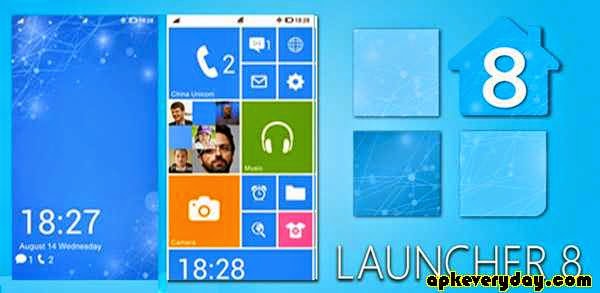
Launcher 8 Pro:
★More energy efficient, fluent and powerful functional.
★Can free download all premium themes.
★Complete experience all the features of the launcher 8.
★Support horizontal / vertical screen, make or use 6 Tiles Columns Themes.
Launcher 8 is a great app for you can ease of imitation and other styles start screen on you Android Phone or Tablet device (Tablet Launcher), fully personalized, free DIY and more variety of exciting themes.
【Features】
- You can add different size tiles;
- You can add a variety of color tile;
- You can save/restore/share and download the themes;
- You can edit the start screen layout;
- You can set the current background style;
- You can switch the application list style
- You can add Android widgets in the tiles;
- You can set the wp8 style lock screen and status bar;
- You can select more than one hundred kinds of theme colors;
- You can add special features tiles, like time, LED light, Live Gallery and Live contact photo.
How to activation all app notification:
1. On Launcher 8 home screen, click Nenu, click “Settings” – “Statusbar” – “Notifications active” – turn on ;
2. Then will go to “Accessibility” – “Services” – “Launcher 8 statusbar notification active” – Activation it.
3. Back to the Status bar setting, enable App Notifications, And make sure the apps running at background , also you can view our video.
What’s New
V2.4.2 update:
- Add single contact avatar animation tile(just support Launcher 8 pro version).
Note: This tile need to read the contact data (Avatar) access permission.
- Fix bugs.
PROBLEM DOWNLOADING FILES? CLICK ME FOR GUIDE HOW TO DOWNLOAD FROM FILE HOSTS SUCH AS TUSFILES, LOUDUPLOAD, ETC..
DOWNLOAD FILE(S) BELOW:
APK:
LOUDUPLOAD:
THEMEDIASTORAGE:
TUSFILES:
TURBOBIT:
IF YOU ENJOY THE GAME/APP PLEASE PURCHASE IT ON GOOGLE PLAYSTORE TO SUPPORT THE DEVELOPER, CLICK THE LOGO BELOW:

Highlights:
● Dual-pane tree view
● Root, FTP, SMB, Sqlite, Picasa, Zip, Rar, 7zip explorer
● Cloud storage access: Google Drive™, Dropbox, Box.net, Mega.co.nz ***, SkyDrive, Webdav, Yandex.disk, Ubuntu One, SugarSync, Dump Truck, Copy.com
● SSH File Transfer (SFTP) and SSH Shell – http://bit.ly/xp-ssh ***
● Application manager
● WiFi file sharing *** – http://bit.ly/xp-wifi
● Manage files from a PC web browser *** – http://bit.ly/xp-web
● Favorite folders
● Built-in viewers for images, video, audio, text
● Hex viewer
● Fast Image viewer with zoom and slide to previous/next images
● Thumbnails for images and video as well as for various file types (depending on associated application)
● Multi-selection – always available, yet not disturbing
● View APK files as ZIP
● Share – send files by Bluetooth, email, or whatever the device supports, from any location
● Configurable buttons and key shortcuts
● Seamless work with Zip (as if it was normal folder)
*** marked features are paid – they require donation
X-plore allows you to see inside of your Android device. And also outside.
This is a dual-pane explorer, there are two folders shown at same time, and common operation such as copying files are done from one pane to another.
And X-plore shows folder hierarchy in a tree view for clear orientation and fast switching to other location.
You may explore internals of the device, and if you’re power user and have your device rooted, you can make changes to system data – backup files, remove unwanted applications, etc.
If you’re standard user, you may choose to hide internal memory from view and be sure not to mess with system.
You can comfortably see contents of mass memories on your device, or possibly attached USB memory stick.
Simple app manager allows to see, run, copy, share, uninstall and further explore installed applications.
WiFi file sharing
Access files on your Android device from other Android devices over WiFi.
Access from a PC web browser
Manage files on your Android device from your PC.
Access to FTP and FTPS (secure FTP) servers is supported.
Multiple servers may be configured.
X-plore can display shared folders on other computers in LAN (local area network).
The system allows access to shared folders on computers connected to LAN, or even remote server if it supports SMB protocol.
X-plore can access various web storage “Cloud” servers, and access their files.
You need to have account in supported web service, then you can access your files stored online through X-plore.
Supported is also SSH File Transfer (SFTP) and Terminal shell emulator.
Main operations are related to managing files and folders – viewing, copying, moving, deleting, compressing to Zip, extracting, renaming, sharing, and more.
Picasa albums
X-plore can list images in Picasa albums, download them, create albums, upload and delete photos, edit captions.
SQLite database viewer
X-plore can show SQLite database files (those with .db extension) as expandable list of tables, each table containing list of rows and columns with database entries.
Main interaction is done by touch screen, clicking on folders or files to open files, or long-click to open context menu which contains options which can be done on particular clicked item, or multiple selected items.
Multi-selection allows to do operation on more files at once. Files can be selected by clicking check box. It is also possible to select all files in a folder, or clear selection, by clicking parent folder’s check box.
Opening file may mean to use one of built-in viewer for most popular file types: images, audio, video and text.
Or you may configure X-plore to use system application for opening files, in which case system-predefined application that can open particular file is launched.
Archives (currently supported are Zip, Rar and 7zip) are displayed as other folders.
Additional interaction is possible by button bar, which is between two panes, and is fully configurable.
What’s New
✔ Small fixes
PROBLEM DOWNLOADING FILES? CLICK ME FOR GUIDE HOW TO DOWNLOAD FROM FILE HOSTS SUCH AS TUSFILES, LOUDUPLOAD, ETC..
DOWNLOAD FILE(S) BELOW:
APK:
LOUDUPLOAD:
THEMEDIASTORAGE:
TUSFILES:
TURBOBIT:
IF YOU ENJOY THE GAME/APP PLEASE PURCHASE IT ON GOOGLE PLAYSTORE TO SUPPORT THE DEVELOPER, CLICK THE LOGO BELOW:


